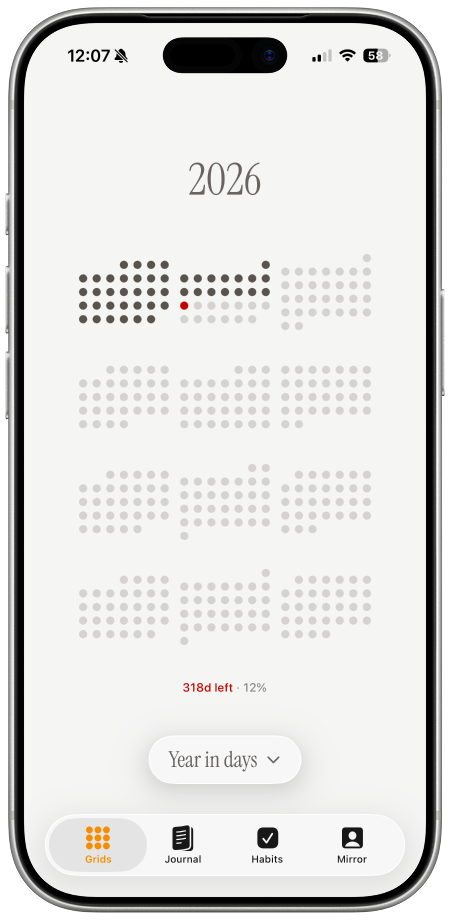
A year progress wallpaper turns January through December into one visual field. Each day is a dot. Past days are filled, today is highlighted, and future days remain open.
The result is more useful than a percentage alone. “58% complete” is precise, but 365 dots show where that percentage sits within the shape of a year.
Why visualize a year as 365 dots?
Calendars are designed around appointments. A year grid answers a different question: where am I in the year as a whole?
The dot format makes time:
- visible: every day has equal space;
- glanceable: progress is clear without calculation;
- finite: the remaining days have a concrete shape;
- personal: color and layout can match your lock screen.
In a leap year, the grid contains 366 days. A generator should account for that automatically rather than forcing a fixed 365-day count.
What the dots mean
A simple design uses three states:
- filled dot: a completed day;
- accent dot: today;
- light dot: a future day.
You can add a small label such as “days left” or a progress percentage, but the grid should remain the main idea. Too many statistics make the wallpaper slower to read.
How to create a year progress wallpaper
1. Select Year in Days
Open the one dot wallpaper generator and choose a daily year view. The date range begins on January 1 and ends on December 31.
2. Choose a layout
A calendar-like grid makes weeks and months easier to recognize. A continuous dot field feels more abstract and minimal. Pick the version you can understand fastest.
Leave enough empty space for the phone clock, widgets, and notifications. Keep the current-day accent visible without making it dominate the entire screen.
3. Pick calm colors
Use good contrast, but avoid nine competing colors. One dark completed state, one pale future state, and one accent for today usually works best.
4. Turn on daily updates
A static image becomes outdated tomorrow. On iPhone, one dot can update through Apple Shortcuts. On Android, MacroDroid can request the new image and set it automatically.
Follow the automatic wallpaper setup guide after saving your design.
Year progress vs. life in weeks
A year progress wallpaper focuses attention on the current season and near-term choices. A life-in-weeks grid uses a much longer horizon and is better for broad reflection.
Neither is more correct. Choose the scale that helps now:
- use 365 daily dots for plans, seasons, and this year’s priorities;
- use weekly dots for long-term perspective;
- use a custom countdown for one event or deadline.
A healthy way to use year progress
The grid is not a score. Filled days do not mean productive days, and empty days are not a threat. The wallpaper only makes the calendar visible.
Use it as a short orientation ritual: notice the current dot, remember the larger year, and decide what deserves attention today.
Create your 365-dot year wallpaper, then enable the daily update automation.